A Python-based, keyboard-first desktop app for browsing, previewing and trimming, audio samples
So. I built a thing.
It’s called Kit Crafter, and before I explain what it does, I need to come clean about something: it is heavily inspired by an existing app called Sample Scout. So heavily inspired that it might look cringe-worthy if you know both. Sample Scout is the original. It’s a beautifully built app with a great idea behind it. You should just buy that one, honestly. It’s the better app.
My version is less polished, less precise, and less everything. I started it while being bored on a holiday trip. That’s basically the entire origin story.
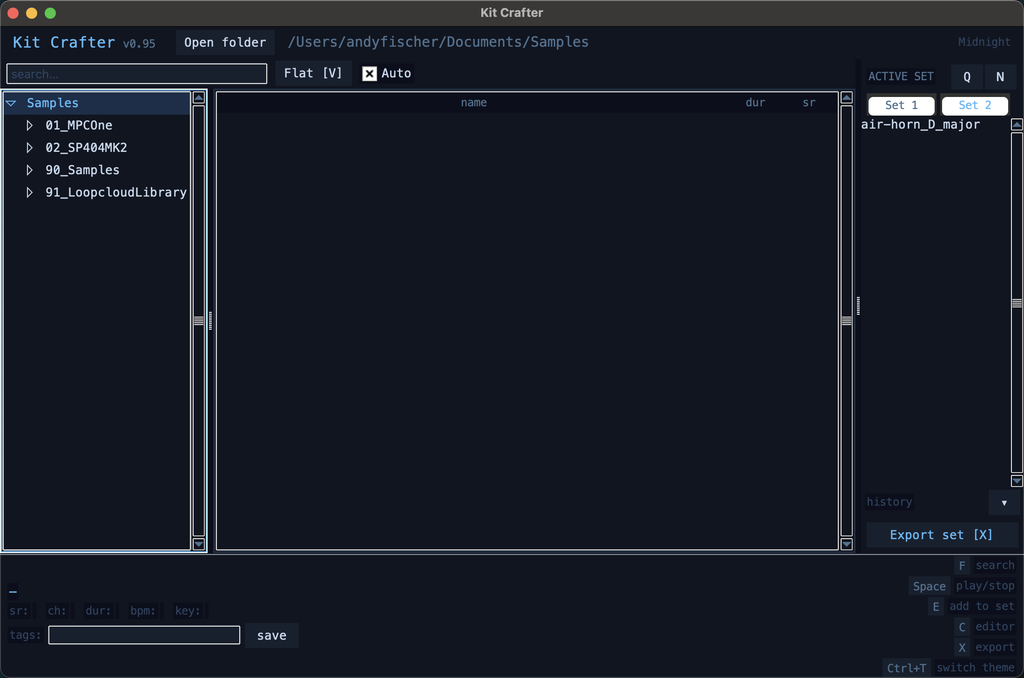
Kit Crafter is a desktop app for browsing, previewing, trimming, and exporting audio samples — keyboard-first, aimed at drum machine and sampler workflows. If you own a TR-8S, an Octatrack, an SP-404, or something similar, you know the pain: you have thousands of samples on a drive somewhere, and getting from “that folder” to “trimmed, normalized, correct format, on the device” is way more steps than it should be.
The app tries to collapse those steps. You browse your sample library with arrow keys, samples play automatically as you scroll through them, you trim them visually, you add them to named sets, and then you batch-export the whole set with your device’s exact specs pre-configured. In/out points, fade curves, normalization, high-pass filter, mono mix-down, sample rate — all of it in one go, background-threaded so the UI doesn’t freeze on you.
There’s a slightly more interesting angle to this project, which is why I bothered writing about it at all.
I used it as an experiment in app cloning — as in, literally cloning an existing app using AI. Not to steal anything, but to understand the process. I looked at Sample Scout, described what I saw and iterated. Doing this as a side-activity I reached a state of roughly 90%feature-completeness after ~3 hours- That might have been 30 minutes if I had worked on this continuously.
The thing that stuck with me: someone left a comment on a Sample Scout review video pointing out that the colour scheme looked “vibe-coded.” And I realized how that comment immediately diminished the original developer’s work in my eyes, even though I knew better. The presence of AI is quietly shifting how we perceive effort — even for people who should know what effort looks like. That is frightening.
Another aspect of AI, vibecoding, etc. that occured to me is that -maybe- versioned source code will eventually give way to versioned recreation prompts as the primary artifact of software development instead. I wanted to see what that actually looks like in practice. There is an AI-generated prompt included in the repo. You can try to recreate the app with one prompt yourself: https://raw.githubusercontent.com/andymann/kit-crafter/refs/heads/main/RECREATE_PROMPT.md. Last time I checked it with Claude Code and Sonnet 4.6 on low effort, it took ~25k tokens and roughly 8 minutes to create a program that seems to look like the program you would build from the sourcecode. As of today, it is a WAY more sensible approach still is to clone the repo and run it like any ordinary Python-application. But if versioned prompts will become a thing in the future- you saw it here first.
python3 -m venv .venv
source .venv/bin/activate
pip3 install -r requirements.txt
python3 main.py
Kit Crafter on GitHub: https://github.com/andymann/kit-crafter